


Evernote had a 10-year head start on Notion. Sketch had every designer on the planet before Figma showed up. And HipChat had every Atlassian customer as a built-in audience when Slack first launched.
But in every case, the company with the head start lost. The companies that won had products that did more of the work for them.
At the fastest-growing SaaS companies, growth runs through the product.
If you’re PLG, the product is your go-to-market. So the signup flows, the setup process, your empty states, the upgrade and conversion experience, and the cancellation flows are incredibly important.
Every one is a key growth lever.
I’m a former 2-time head of growth, and over the past 5 years I’ve coached 100+ other growth leaders from some of the fastest-growing startups in the world. And in this post, I’m going to share 5 secrets that those companies use to pull their growth levers, including the one that decides whether your team gets more budget next year or potentially gets cut.
Secret #1: They give you the product before you ever have to pay for it
In the past, if you signed up for Notion, the very first thing that you’d see was a blank page. A blinking cursor. The scariest screen in software.
The user has nothing to click, nothing to copy, and no idea where to get started.
So Notion built thousands of templates, eventually letting their own users build templates. Today they have a library with over 70,000 to choose from.
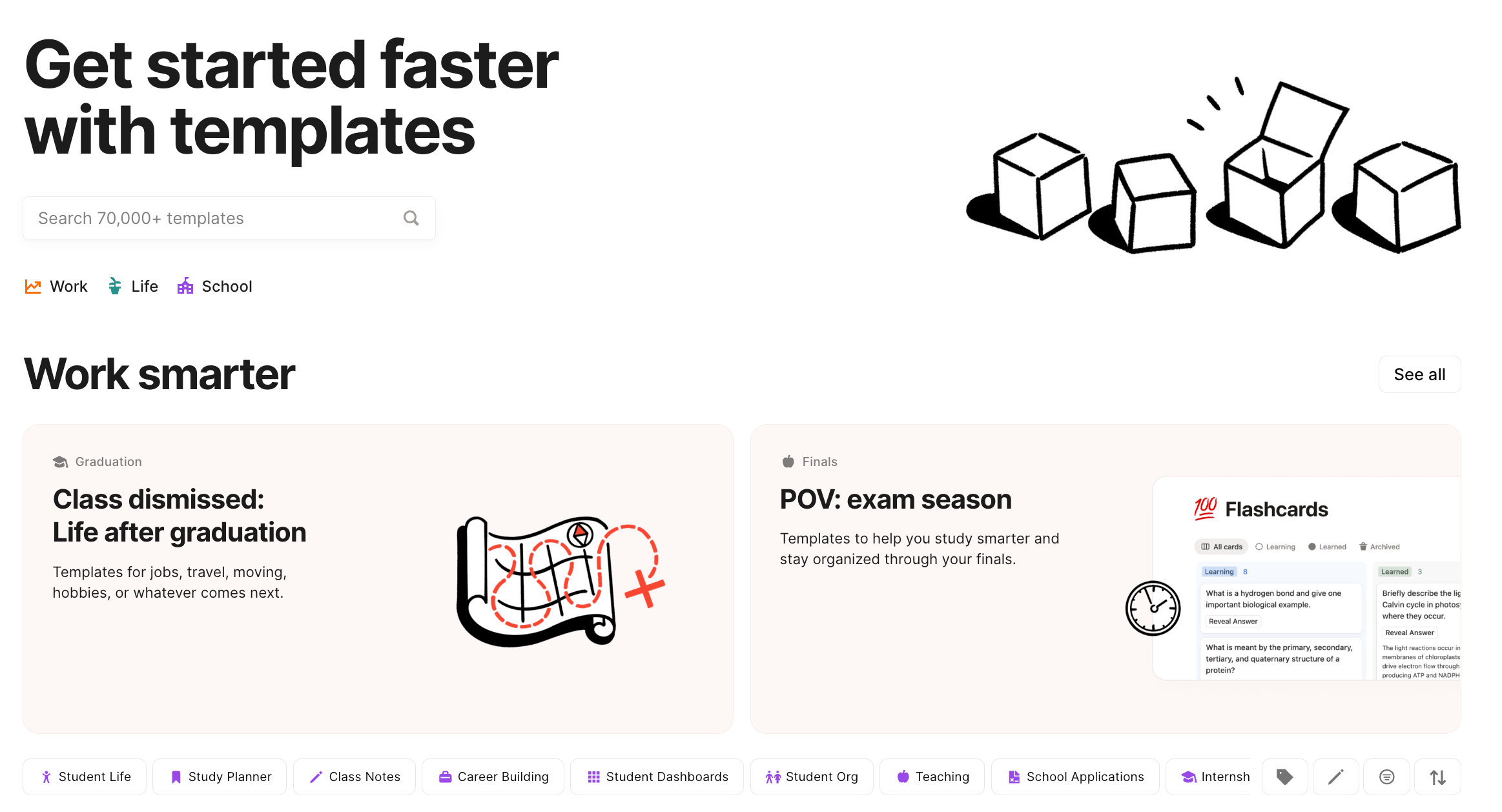
Now, every template helps Notion scale because it impacts 3 growth levers at once.
Discoverability: templates create tons of content that ranks when somebody searches for things like “weekly planner template.” They cover a ton of surface area for high-intent, long-tail keywords to help their brand get found on search engines and LLMs.
Acquisition: all of those landing pages create unique entry points into the product. So instead of having 1 “sign-up” page shown to every visitor, they have 70,000 that are completely personalized to the specific search intent.
Retention: after the user signs up, these templates help new users get past that blank page/ blinking cursor challenge way faster. Instead of starting at zero, users have content they can just customize to their specific use case.
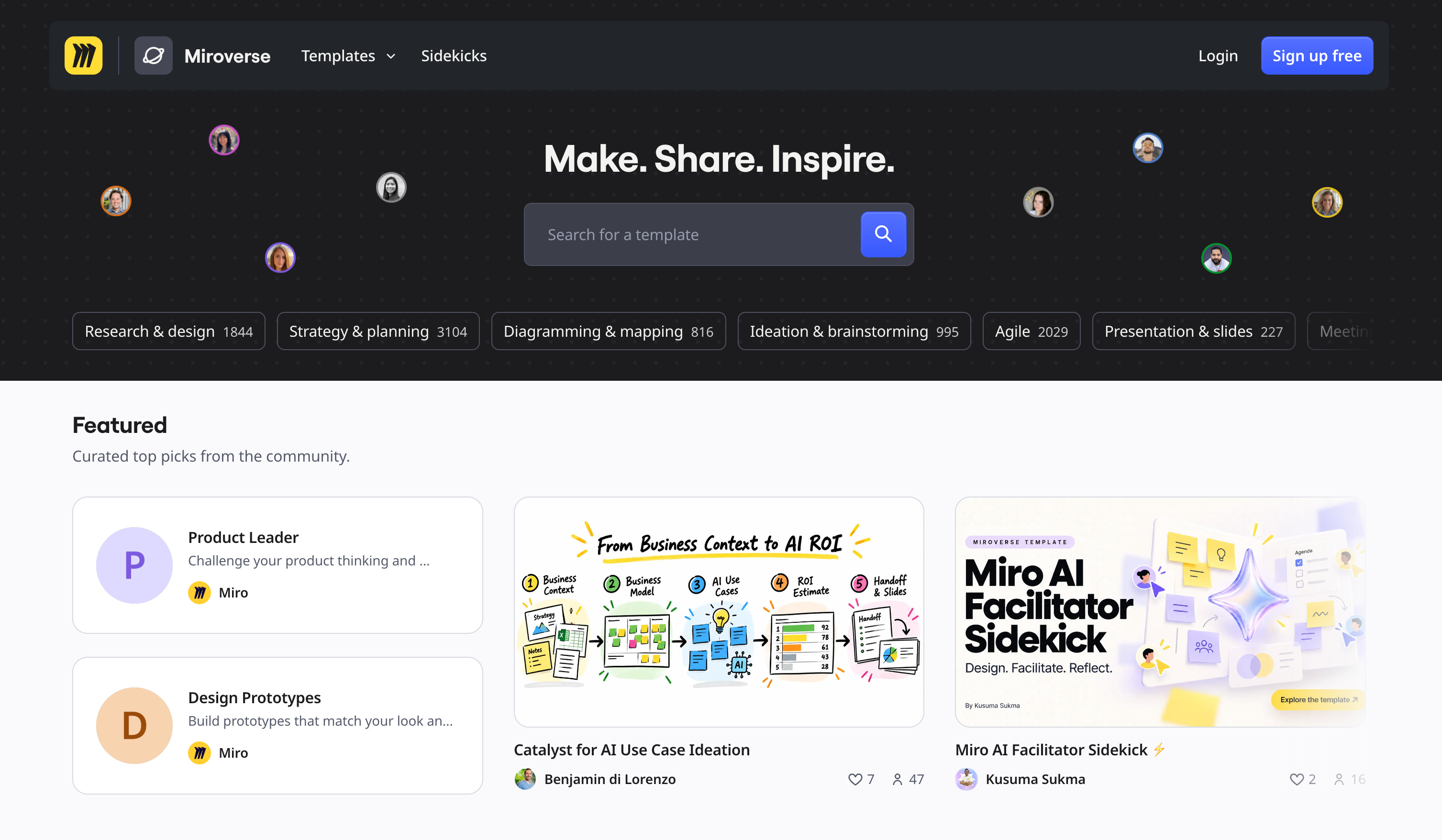
Canva runs this playbook too. Their templates have essentially become the core product.
Figma also did it with their community, where you can grab someone else’s file and start editing it in just a few seconds. And Miro created a massive template library aligned with their most common use cases.
Now, compare templates as a growth lever to a lot of the traditional inside sales process that’s still run today:
A user fills out a form, they book a sales call, a rep reaches out and schedules a conversation, and eventually demos the product does on a call.
That experience makes people ask for the product, and it delays the value.
Contrast that with a template, which gets them into the tool quickly, using it, customizing it to their specific needs, and experiencing that value in minutes.
And there’s a name for why this works, too. It’s called the endowment effect.
People put more value in something when they think it’s theirs. So the second your team signs up for Notion and puts your strategy and roadmap inside, it becomes instantly more valuable.
The team built something exactly like this during my time at Postscript.
At the time, SMS was still a relatively new channel. We learned that many people signed up for the tool and never got started because they weren’t sure what types of campaigns they should launch, or which types were most effective.
So the team created a template library that allowed them to inject everything that we learned, the best examples and use cases, straight into their account.
It created a bunch of pages that ranked and drove acquisition, and it was a massive product retention tool also.
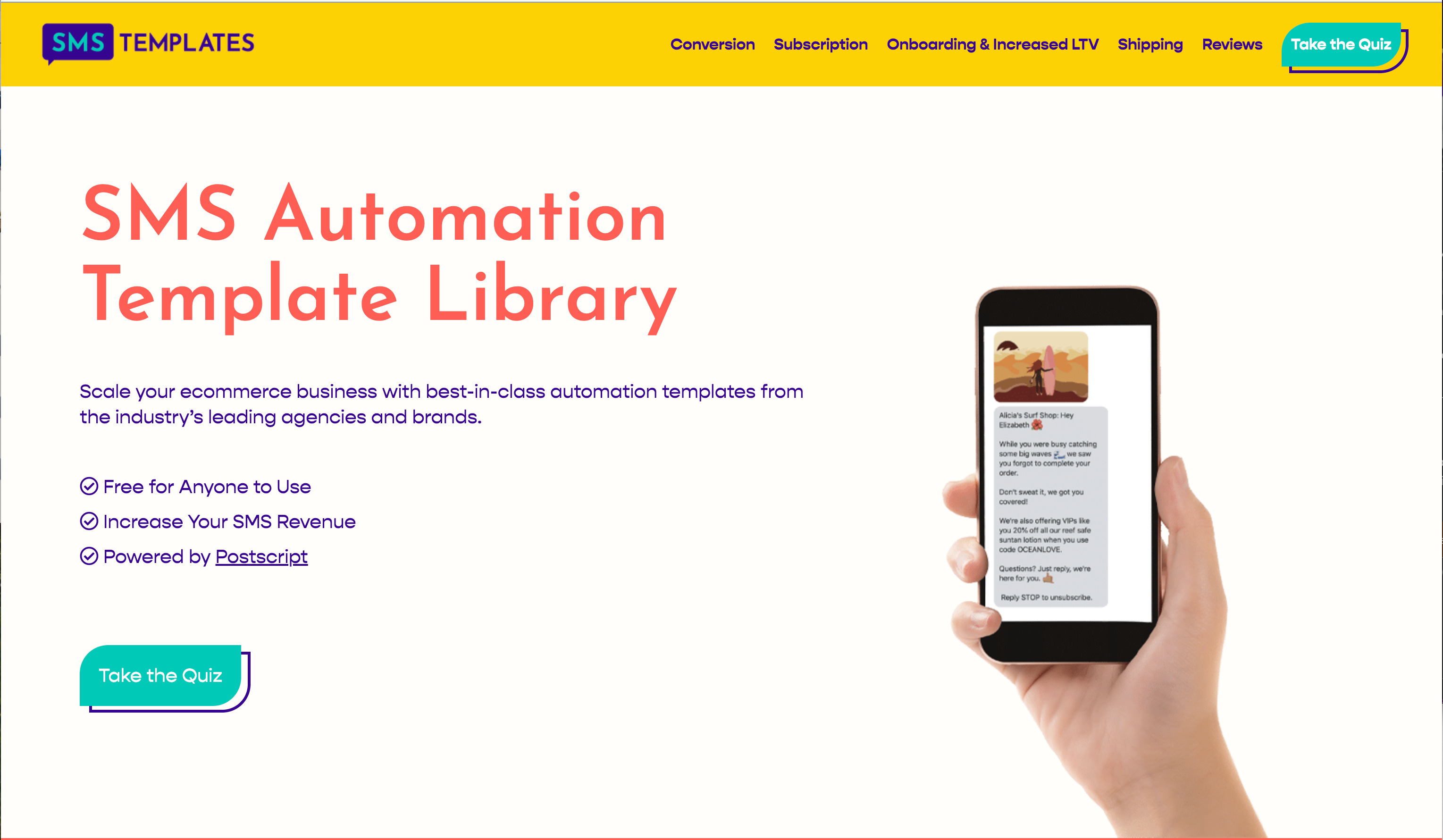
*Note: this screenshot is from the wayback machine and the team has changed how they leverage templates over the past few years since I’ve left.
The 2 challenges with templates as a growth lever.
1. Figuring out who owns it
The ownership and accountability is challenging because templates cover 3 different growth levers. That means they sit between product, content, marketing, and growth.
So I’d recommend getting an executive-level sponsor who oversees the project holistically, with 2 main stakeholders or collaborators on the work:
One person or team (depending on how large you are) that’s accountable for the discoverability + acquisition side of the project. IE, getting people to the site and signing up from the template pages.
Another stakeholder that’s accountable for the retention piece. IE, making sure the templates are effective at helping people get set up, activated, and building habits.
2. Deciding where to get started (which use cases)
If you’re not sure where to get started and you’ve got a thousand templates you could create, prioritize your highest-value use cases first.
And if you’re not sure what those are today, the easiest way to find out is to run a survey. Ask new accounts:
“What’s your main goal for creating an account today?”
Then see which of those answers go on to purchase plans, and which plans (pro vs starter, etc).
Templates are really helpful in getting more high-quality users to sign up. Which brings up the next question… how do we want them to use the product next?
Secret #2: They obsess over activation
Early on, the Slack team noticed that teams who sent 2,000 messages or more tended to stick around. (source)
So Slack organized their whole company to get every new team to that 2,000-message mark. Their onboarding flows, blank states, emails, and product nudges all helped new accounts get to that same metric.
Facebook very famously had a similar activation metric years earlier, 7 friends in 10 days. When a new user got to that milestone, they stayed.
A lot of the fastest-growing SaaS companies have different versions of this as their north star. For Canva, it’s successfully creating and sharing a design. At Pinterest, it’s saving content within your first session.
And with my team at Wistia, when I was leading growth, we wanted new accounts to share their first video with somebody else. We obsessed over that metric.
Now, contrast that focus on activation, usage, and value with what happens at a lot of other companies.
They set these big internal, public goals around increasing the number of signups by some order of magnitude, and they pay way less attention to the retention and conversion side of things.
I’ve seen this a ton as a coach for heads of growth and as a SaaS Advisor.
Where a company has really low conversion rates, but they’re still celebrating hitting a signup/lead milestone. It drives me crazy.
Acquisition helps you figure out if your marketing channels are working. But activation is the road to monetization.
Why signup goals backfire
There’s a name for why this happens at a lot of companies… Goodhart’s law.
By setting a public goal, a team will figure out a way to hit the goal, regardless if it’s in support of the bigger picture.
Basically, if you set signups as a goal, your team’s going to get really good at generating signups.But they might be cheap, low-quality signups.
They might be from people/ accounts who are never going to use your product in a meaningful way and will never convert into a paying subscriber.
So if you’re leading a growth or marketing team and you inherit a massive signup goal when you first start the gig, from your CEO or from your board, and you never renegotiate it, you might end up being that person hitting your goals but not impacting revenue.
That’s one of the big traps.
The second is picking and defining your activation rate without rigor. Doing it by gut, or tenure, or seniority - without anybody fact-checking to make sure it actually leads to the business outcomes you want. Conversion and retention.
How to find your activation moment
If you’re not sure how to do this and you work at an early-stage company, I like asking open-ended questions in surveys or interviews.
Reach out to folks who recently became customers, or users who recently converted from new user to active user, and ask them to tell you the moment they felt like they first experienced the value of the product.
See what the common answers are and use that as a starting point for your activation metric.
If you’re a little later stage, with a little more confidence in your data, you can do this more quantitatively. Take a peek at the folks who recently converted from new user to active user (and hopefully eventually paying customer). See what they did in the early days that led to their retention, and inversely, double-check that against the things they didn’t do.
What you’re looking for is a small number of actionable steps that predict future intent to use the product again and hopefully convert.
So eventually, you’re looking for something like this:
Users who [take this action] in their first X days retain at Y% and convert to paying subscribers at Z%.
Once you land on this definition, take it to your execs.
Because if you’re a growth leader and you walk into the exec meeting and say, “Hey, I found a better north star metric that predicts retention and conversion,” you’ll probably get to rewrite your goals.
Once you know what your activation moment is and you’re obsessing over it, the next question is, how fast can we get somebody to activate?
That answer changes depending on who the user is.
Secret #3: They customize the first user experience based on who signed up
If you sign up for Canva, one of the very first things they ask, right after you give your email address, is “What will you be using Canva for?”
When you pick your answer, the entire product experience rearranges. The templates they suggest change. The examples they email you about change. The first thing it suggests you design inside the tool changes.
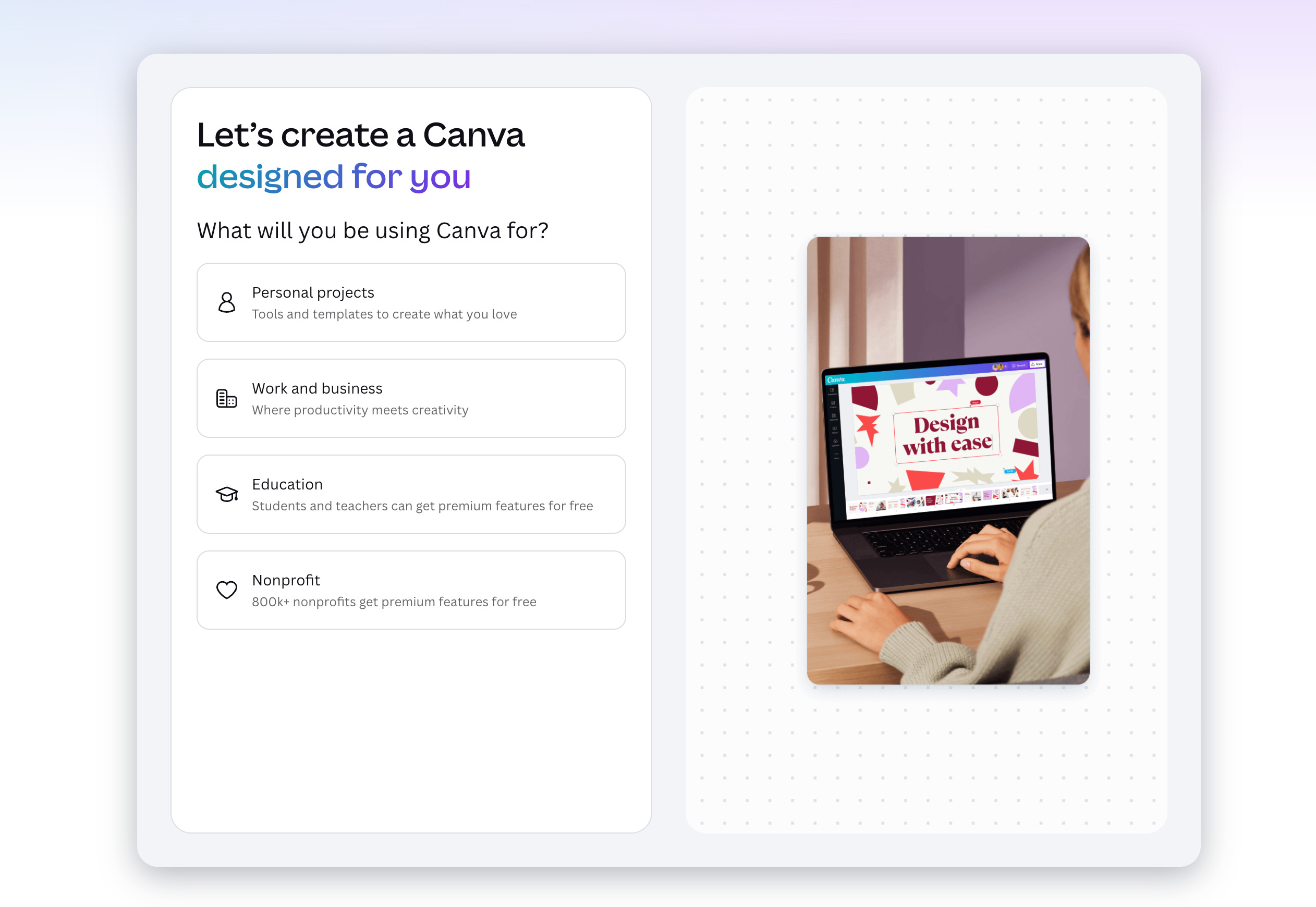
All the biggest PLG companies have a version of this too.
Duolingo asks what you're learning and how much time you have. And their app looks totally different for somebody who’s cramming for a trip compared to somebody who wants to do 5 minutes a day for the next 6 months.
Calm meditation app is one of my other favorite examples. When you first sign up, the very first thing they ask is, “What’s your main reason for wanting to meditate?
Then they customize everything you see to your answer.
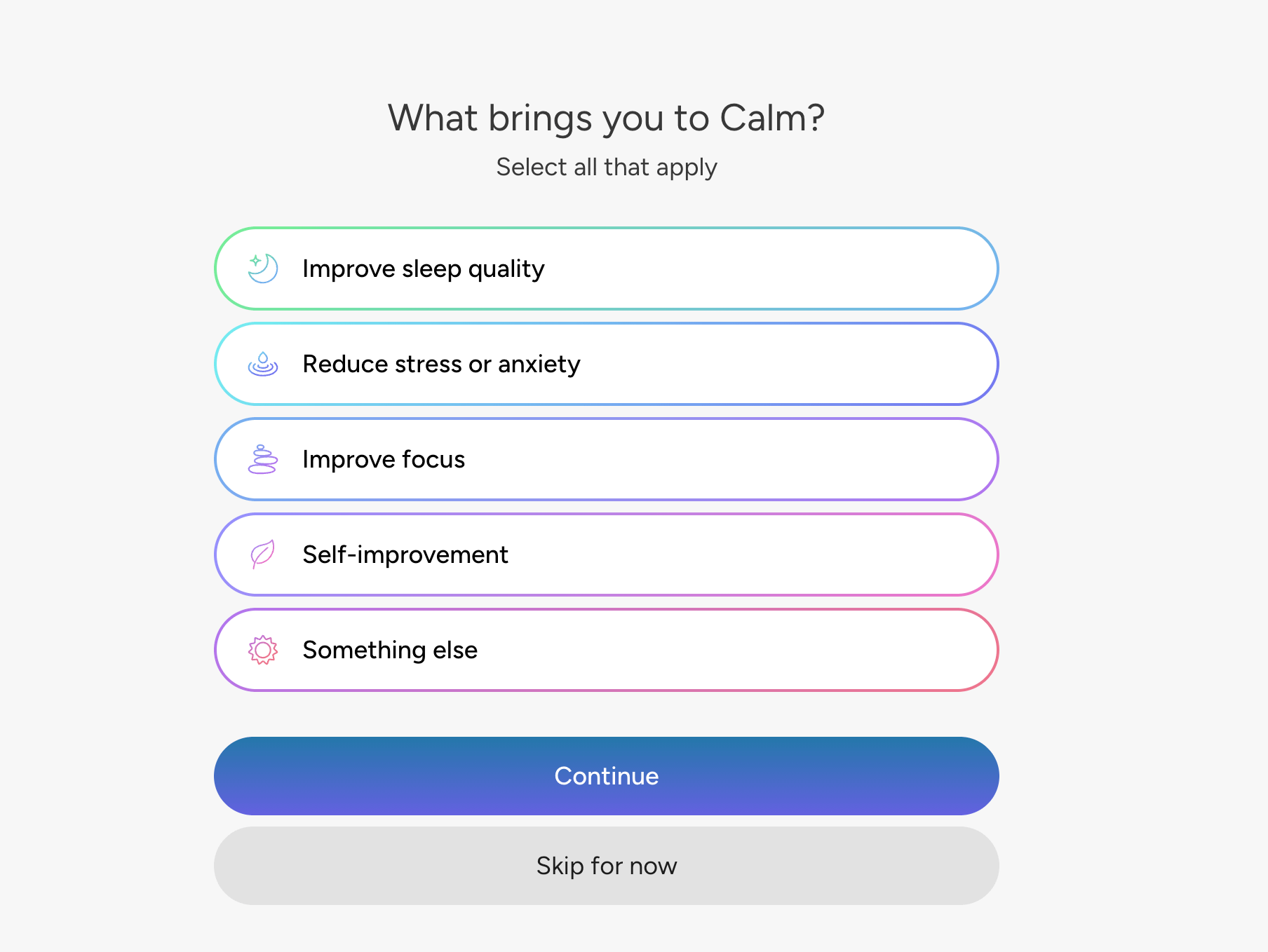
If you select, “Improve sleep quality” the background literally changes to a dark, starry night.
I’ve implemented something very similar at basically every single company I’ve worked at. At Wistia, we asked 2 questions that were super actionable:
What’s your level of experience with video? Beginner, intermediate, or advanced?
What’s your main goal for using video, for creating your account in the first place?
We changed our onboarding sequence, the email copy, and the in-app nudges based on your answers.
If you said, “I’m a newbie,” we gave you intro-level instructions. If you said, “I’m advanced,” we showed you all the badass advanced features.
A marketing use case got marketing examples and marketing features. A sales use case got sales examples and sales features.
These answers are called jobs to be done.
The idea is that people essentially hire your product (or sign up for your product) to do a specific job, to accomplish a specific task.
If your onboarding experience isn’t customized to help them achieve that task or do that job, you might show them the wrong stuff, which means a user is going to think maybe your product isn’t the right one for them.
Even if your tool can do the exact thing they want, they might just not be able to figure it out on their own, or quickly enough.
The 3 traps with customized onboarding
Trap number 1 is buying into the concept but over-engineering it.
This has happened with a few teams I’ve shared this concept with. They get excited, they go out and design like 12 different onboarding paths, and then you end up with all of this stuff you need to manage. Stuff breaks, and you’ve got to rebuild it every time the core product experience changes.
Trap number 2 is making the signup form way too long.
Asking a bunch of questions that might be interesting to know the answers to, but aren’t actionable. If asking a question in the signup form doesn’t change what you want to show them next, don’t ask it.
This matters because over the years I’ve learned that a new user has a certain amount of time and attention they’ll apply to your product.
You want to spend that time helping them gain as much momentum and get as much value inside the tool as possible. We don’t want to waste it on any unnecessary questions, friction, or process.
Trap 3 is the idea that onboarding only belongs to the product team.
Other teams just do the emails, or work on the low-code popup, tour, or checklist tools, but they’re not going to have an impact on the core product design of the onboarding experience.
How to build your first onboarding recipes
If you’re interested in creating your first recipes (as I call them), meaning onboarding flows and different ways to segment your onboarding, the first thing to do is figure out the main reasons folks are signing up.
I like to start with one open-ended question on the signup form: “What’s your main goal for creating a new account today?”
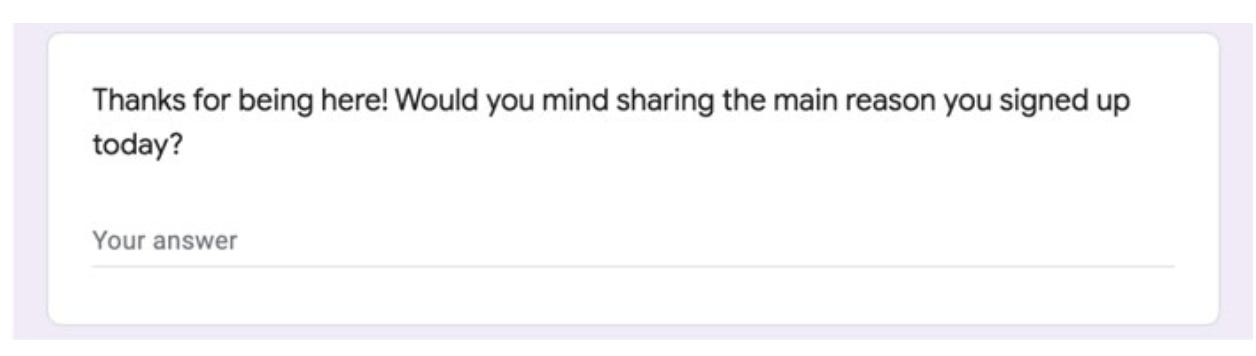
Then look for the 4 or 5 most common answers.
Typically, people use different words to describe the same thing, and those answers will cover like 90% of your signups each month.
Next to each of those goals, write down the first thing that person should see.
What’s the screen, what’s the template, what examples do you want to send them? That should eventually help you land on customized onboarding recipes. They should all lead users to that activation moment. We’re just taking them down slightly different roads to get there.
Asking that question at the moment of signup (”What’s your main goal for creating an account today?”) actually does more than one job. It also helps you determine who goes to sales versus who stays in the one-to-many flow.
Secret #4: They decide who gets routed to a human-assisted experience
Today, if you sign up for HubSpot’s CRM from a 5-person startup, you’re going to get the one-to-many experience.
You’ll get marketing emails. You’ll use a product that’s really simple and intuitive. There’s a path to upgrade inside the tool where you can do it yourself. Just pull out your credit card when you’re ready.
But if you sign up from a 500-person company, there’s going to be a rep in your inbox or your voicemail within a couple hours.
It’s the same product and the same signup form, but a completely different user experience, decided by 2 things:
what you told them at signup.
what you did inside the tool.
Slack runs a very similar play.
If you’re a small team, you’re probably not going to interact with a salesperson, but big ones do. And the handoff typically happens based on some invisible signals that sync with their CRM. Not somebody eyeballing a list and using their gut.
How routing goes wrong
If you’re going to run this play, there are a few ways it could go wrong. The main one is that you just end up moving conversions from one pocket to another, from self-serve to sales or vice versa.
If you end up calling every single signup and you don’t have this routing in place, you’re probably going to call folks and put them into the sales process who are small and happy to buy on their own.
It probably doesn’t make sense to have a human inserted in the process for a bunch of those folks.
The flip side is also true.
If you don’t call anybody, you’ll leave conversions on the table, because some of those folks need help.
They might have custom procurement needs. Or maybe they prefer to buy in a sales-assisted way. So it’s important to use these signals to identify the leads where it makes sense to insert humans in the process.
The name for this is the PQL, or product-qualified lead.
Instead of scoring people based on a form submission (which is typically how marketing qualified leads are scored), we want to score them based on their product behavior.
Did they do high-intent activities?
IE, did they invite teammates? Did they connect a high-value integration? Did they hit a usage limit? Or did they just raise their hand and ask to speak with sales? These are all helpful qualifying signals.
The trap here is routing based on one signal.
If you only route at the moment of signup, you’ll find that some folks don’t look like an enterprise account when they sign up. They might not have an impressive company name. They might not have a huge procurement team involved. Nothing that screams they might need or be eligible for a high-volume discount. But then they start behaving like one of those bigger brands.
If you’re only reading the signup data (company size, title, industry, that kind of stuff), you might miss this.
And if you’re only reading the usage data, you might miss the big accounts that were obviously enterprise the second they filled out the form, just because they didn’t engage in a meaningful way.
That’s why you want a few different moments in the journey where a PQL can fire into your CRM, and a few different types of PQLs.
Sometimes there’s also a leadership-level trap here, where teams get stuck debating these signals endlessly.
What each signal means, which are most valuable, etc. They spend so much time building something incredibly complex instead of something super actionable, at the expense of maybe being slightly less accurate.
My 10 cents is to keep it simple. See if you can start with a real simple sentence:
If they look like [this] at signup, or they do one of these [2-3 specific actions] in the product, a human reaches out. Everybody else stays on the self-serve path.
Routing helps decide who gets that human-assisted experience on the way in. The last secret is about who gets one on the way out.
Secret #5: They treat churn as 3 different challenges (because they are)
Some of your churn is going to be involuntary churn, like a credit card that expired.
Other churn will be voluntary. People signed up and never activated. Or accounts that used the product in a meaningful way, then stopped and decided to cancel.
But those are completely different problems.
Many companies treat them all the same way. They send a “we’re sorry to see you go” email, or maybe they have some special copy on the cancel page inviting them back if they want to stay.
The fastest-growing SaaS companies in the world create the same type of recipes and segmentation to offboard customers as they do to onboard them.
Many start by asking, “What’s your main reason for canceling your account?” and then customize their communications, with some special offers, based on your answer.
When someone clicks the bubble that says “I’m just not seeing value right now” or “I’m not using any of the features I’m paying for,” you can show them all the premium features they might not have realized they’re currently using.
If somebody says, “I just haven’t used this product in a while,” maybe you give them a special offer to pause and save all of their progress and content for a couple months at no cost.
And if someone says, “You know what? It’s just too expensive for me right now,” they can be given a time-limited discount.
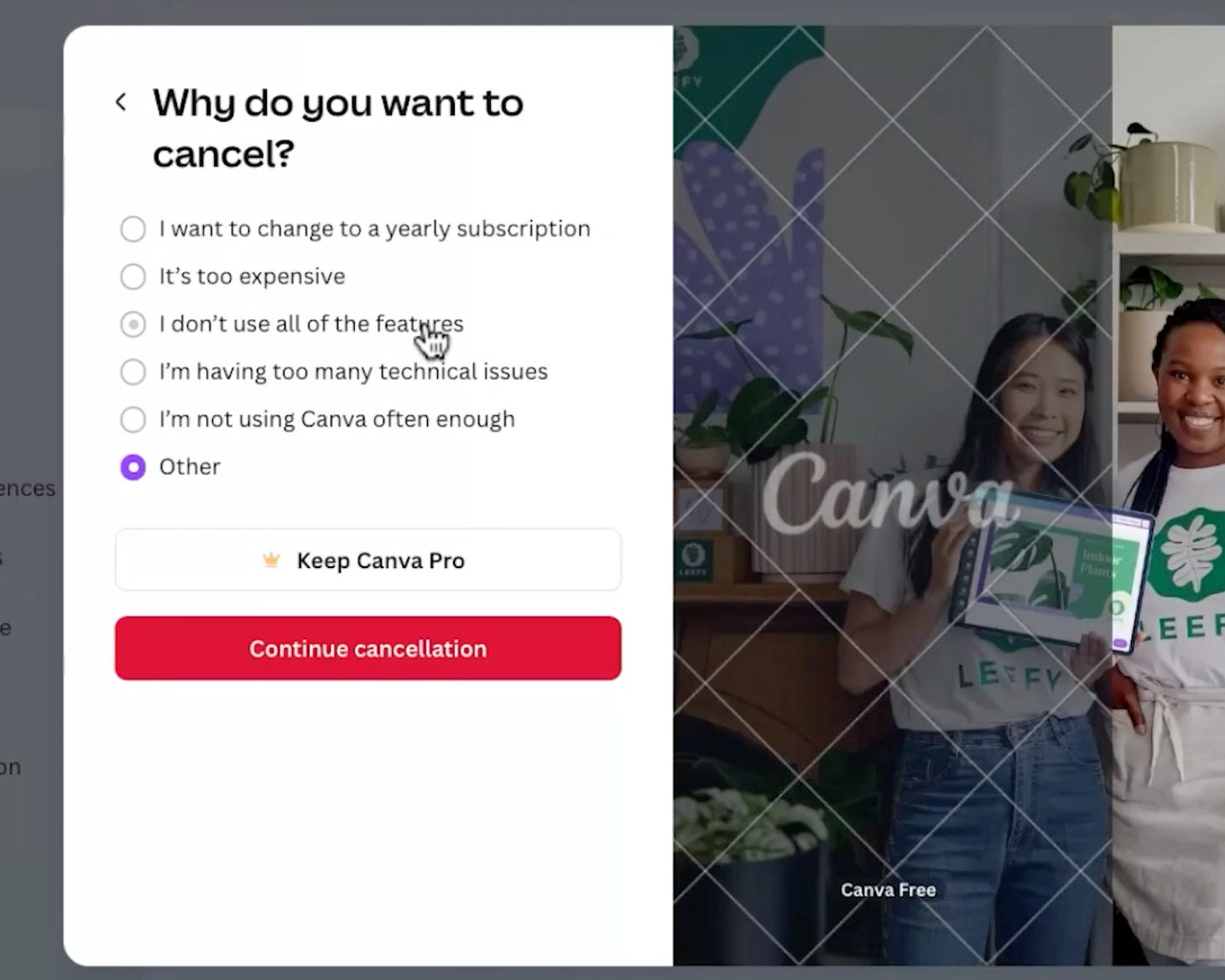
(I actually did an entire deep dive into Canva’s cancellation experience. I think it’s world class.)
These all work because of the concept of loss aversion.
Basically, if you show people exactly what they’re going to lose, and ideally give them a special offer to keep it, a lot of them will take that offer to avoid losing all of their stuff.
Individually, each of these recipes will save users from churning. Combined, they can have a huge impact.
The trap here is treating voluntary and involuntary churn as the same challenge, so it gets the same owner (usually customer success) and the same plan to keep folks, instead of treating each one uniquely and creating unique paths based on the common answers.
If you haven’t done this already, start by learning the common reasons accounts churn.
See if you can eventually let them self-select their reason as part of the offboarding experience, just like they do in the onboarding experience.
Then, once you’ve figured out the common reasons, bring those numbers (and the plan) to your execs, instead of just talking about churn as one all-encompassing number.
A team with a plan for each type of churn is really hard to cut. A team that only owns the signup number is the first one to go when things get tough.
The growth plan is 1 of 3 jobs as a head of growth
Everything in this post helps with job number 1 for a head of growth… growing the business.
But a plan only works if someone owns it. That's job number 2, leading the team. Because each lever needs a clear owner and an operating system to run it.
And job number 3 is growing your career. Being right is half of it. Being effective is the other half.
That means learning how to communicate your thoughts to people who don’t speak growth, bringing folks along, and convincing them these playbooks are worth prioritizing.
The growth leader who can do that probably gets to rewrite their goals.
The other one celebrating, “Signups are up 30%!” get asked why revenue hasn’t moved. And when things get tough, their team is the first one to go.
Cohort 2 of the Growth Council kicks off in October.
The Growth Council is my peer mastermind for growth leaders working on growing the business, leading the team, and growing your career.
It’s a small group of Directors, VPs, and Heads of Growth - meeting twice a month.
You bring the real stuff you’re stuck on (the signup goal you inherited, the roadmap pushback, the exec meeting you’re dreading) and work through it with people who sit in the same seat.
Evernote losing to Notion despite the head start is the right example, distribution through the product itself just compounds in a way marketing spend doesn't. Seen the same gap on client SaaS builds, the onboarding flow does more for retention than any campaign running alongside it.