


I’m going to break down the most effective cancellation experience that I’ve ever seen (with data) - and help you apply the same churn saving principles to your brand.
The key word here is “principles.”
Because copying another brands tactics or playbooks is usually not a winning formula. There’s usually a lot of important context that influences if a popular tactic is successful. Tactics aren’t plug and play.
So, if you can learn the psychological principles - and when they’re most effective, you can create your own churn saving playbook.
So let’s get into it.
(and if you prefer a video version of this post - I just published a YouTube video doing a deeper dive below)
The only reason I found this flow was because I almost canceled my Canva subscription. I’m finding myself using Nano Banana a lot more these days, and figured I’d could save a few bucks by downgrading to Canva’s free plan.
In the process, I stumbled onto a masterclass about how one of the biggest PLG brands on the planet saves users from cancelling.
Because instead of the usual dull confirmation screen, Canva showed me a list of exactly how I was using the pro plan - and how many times.
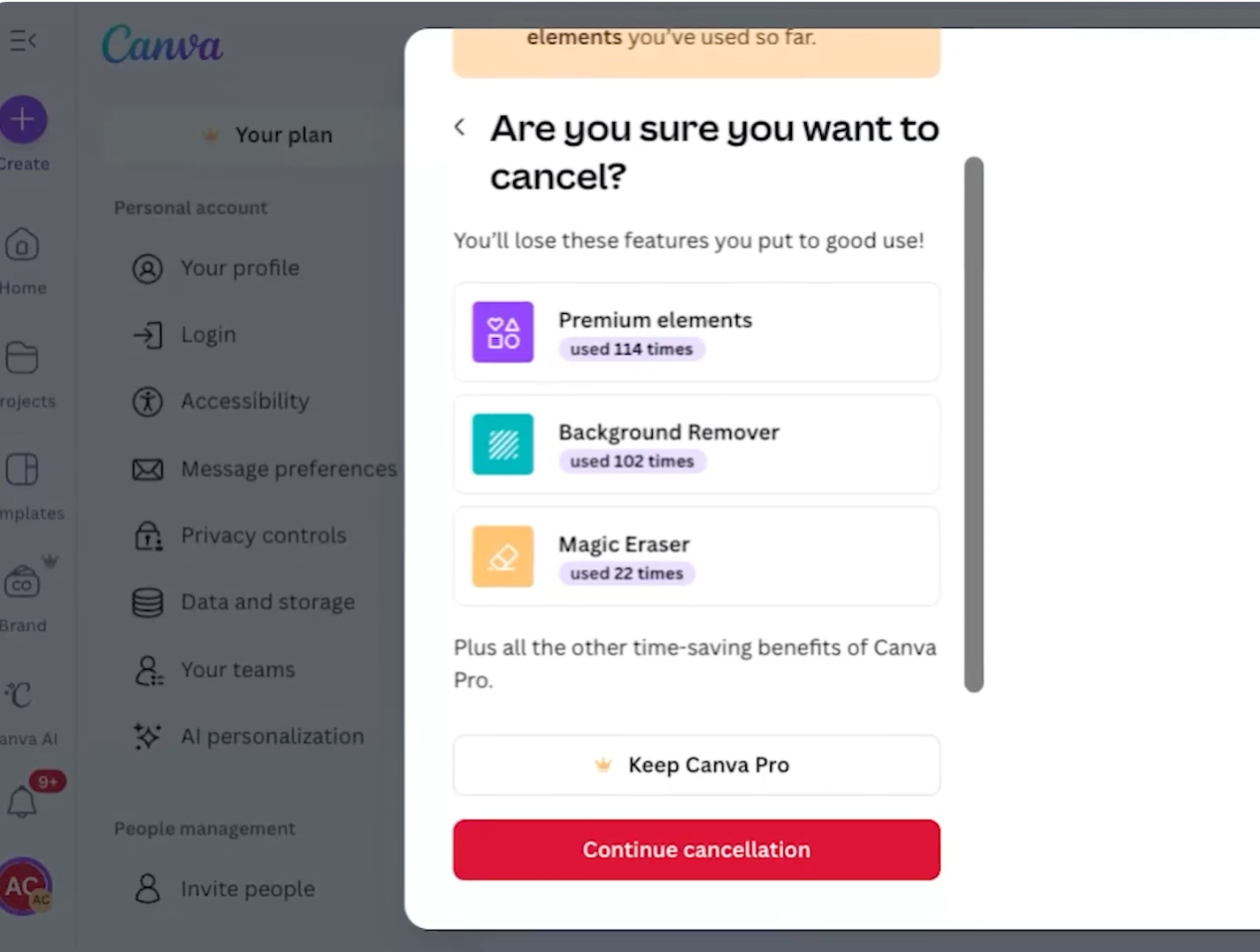
Premium elements used 114 times. Background remover used 102 times. Magic Eraser used 22 times.
I paused.
Because I hadn’t realized I was using this stuff so frequently. And I wondered if I actually still needed it.
Churn Does Not Start at Cancellation
It is the final step in a long decision-making process that started weeks or months earlier.
The signs are almost always there if you know where to look.
Users stop logging in. They stop completing key actions. And stop engaging in a meaningful way. Those signals show up clearly in product data and in your CRM.
But most PLG teams ignore them.
Instead, they obsess over acquisition, onboarding, and free-to-paid conversion.
They spend enormous time and money getting users in the door. Then, after they’ve acquired an active user, they largely give up. Which is wild, because at scale, churn becomes one of the biggest growth levers in the business.
Still, even if cancellation is late in the game, it matters.
It is your last clear chance to remind someone why they paid you in the first place. And it’s your last chance to re-engage a user before they downgrade.
The Wrong Way to Reduce Churn
Many companies try to “save” users in all the wrong ways.
They add friction.
They hide the cancel button.
They force users to call support, submit tickets, or jump through hoops.
Gyms are famous for these dark UX patterns. I currently belong to two gyms, because Planet Fitness won’t let me cancel my plan online, over the phone, or using their app. Instead, I have to physically drive to the gym and cancel in person. What a pain in the ass.
It works for sure, but it damages trust.
It creates a bad brand experience that users remember (and write about on their Substack).
The better approach is clarity.
Does This Actually Work?
That was the question I had too.
So I asked my friends at Churnkey if they could share some data on different cancellation approaches - and their impact on churn.
(this isn’t a sponsored post, but Churnkey hooked up some proprietary data here - so if you do want help reducing churn, check ‘em out)
They aggregated churn data across their entire customer base - and the results are hard to ignore.
Here are four patterns that consistently reduce churn (and by how much).
1. Loss aversion
When users are clearly shown what they will lose, like the features they use or credits they haven’t consumed, over 55 percent abandon the cancellation flow immediately.
More than half simply stop and keep their plan.
2. Special offers
Targeted offers like a pause, a temporary discount, or plan flexibility save about 53% percent of users who see them.
That’s way more than I anticipated.
3. Surveys
Simply asking why someone wants to cancel saves roughly 30 percent of users at that step.
One out of three accounts pauses long enough to reconsider.
4. Double opt-out
A clear “Are you sure?” step saves about 10 percent more users from churning. Which feels small, until you stack it with everything else.
Stacked together, these patterns can be pretty impactful!
What Canva Actually Does
Canva stacks these ideas with intent.
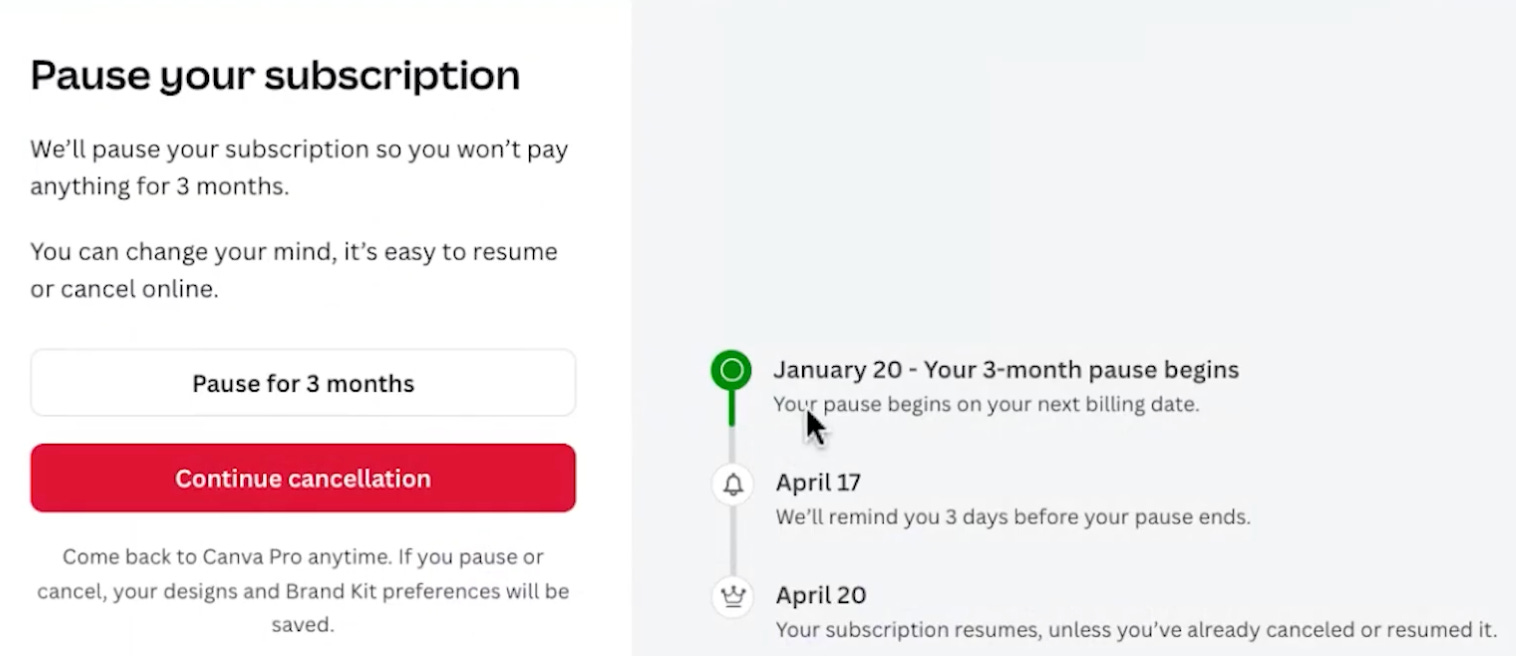
The first thing you see is an offer to pause.
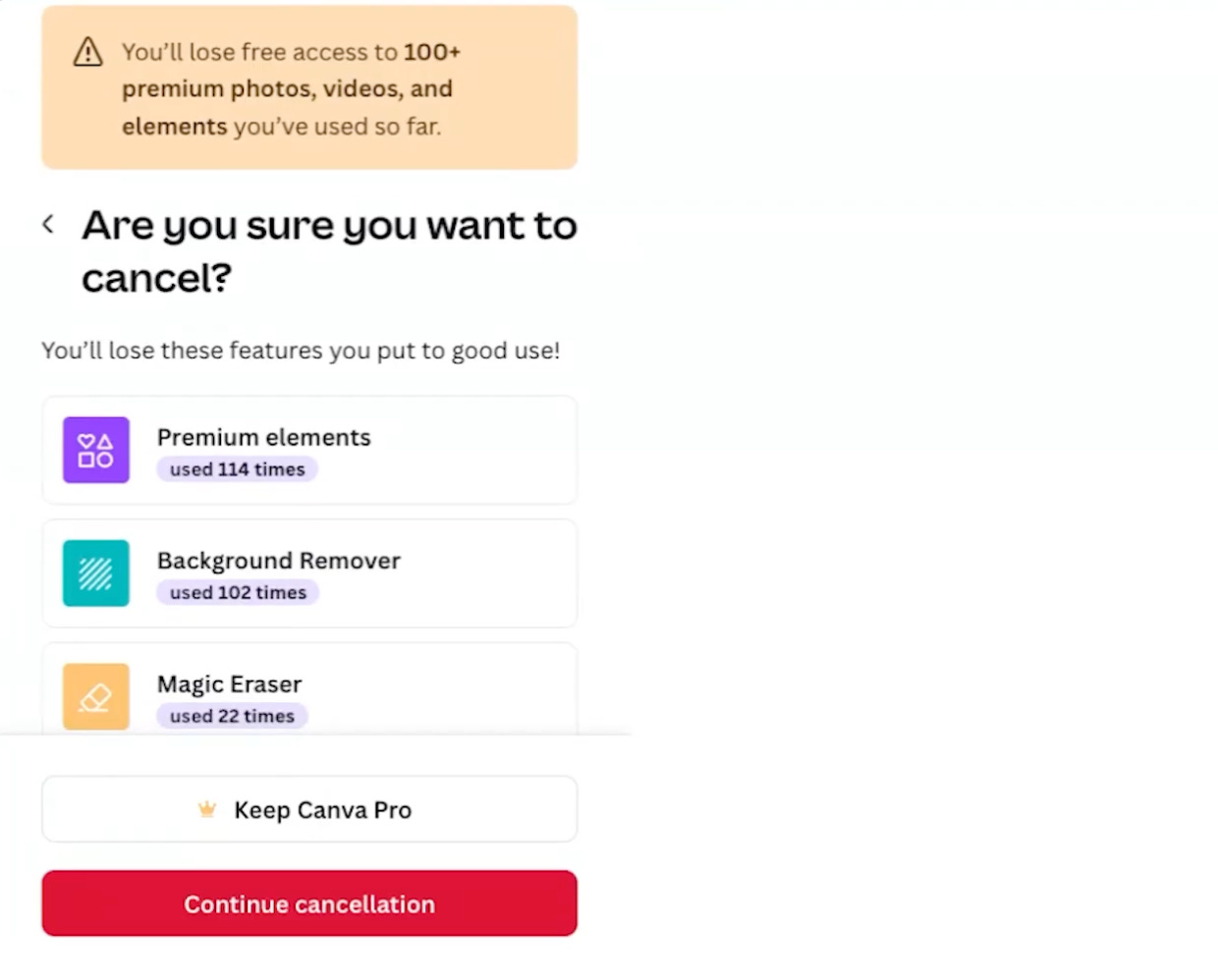
If you continue, you see your specific usage data.
Not generic features included on your plan. Your behavior based on what’s on your plan.
If you still continue, you’re asked why.
A simple survey (sometimes followed by another offer depending on your selection here.)
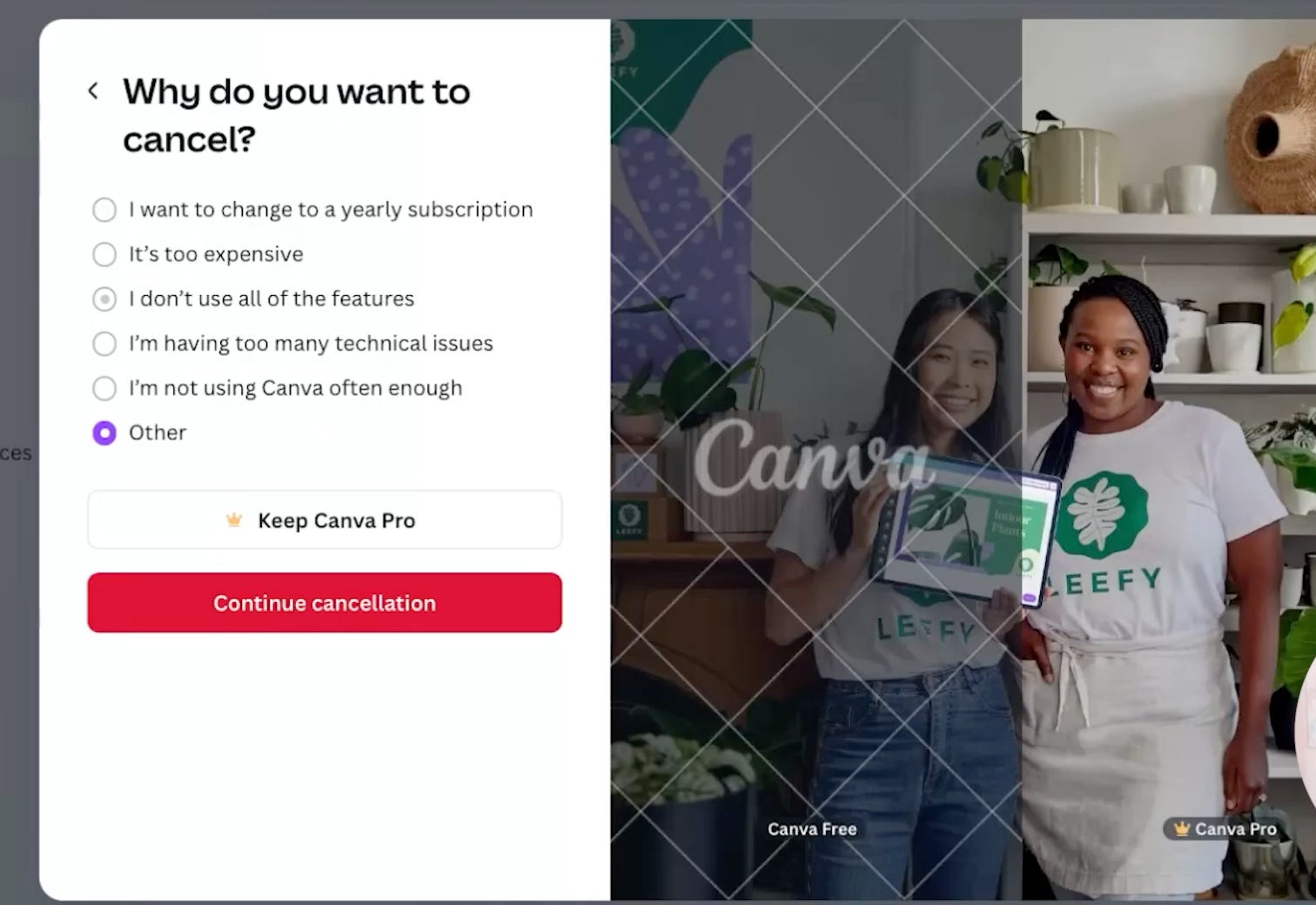
Nothing here feels sneaky. Nothing feels confusing. There’s no dark UX patterns.
It is direct, respectful, and (based on the data we just explored) effective.
Why This Works Psychologically
Several simple psychological forces are doing the heavy lifting.
1. Motivated reasoning.
Most users arrive at cancellation with a story already formed.
“I do not use this enough.” “It is not worth the money.” “I should cancel.”
Usage data interrupts that story.
2. Personalization.
This is not generic marketing copy written for everyone.
It is about you, your plan, and your behavior.
Personalized messages are harder to ignore and more emotionally sticky.
4. Endowment effect.
Once users see their usage, ownership kicks in.
This is my plan. These are my tools. I rely on this more than I realized.
5. Loss aversion.
Once ownership is established, losing something hurts more.That pain is what stops people mid-cancellation.
These 5 things aren’t new psychology.
We’ve learned these are powerful tools when applied in other areas of our growth model. Most companies already use these in acquisition, onboarding, and pricing.
It makes sense to apply them across the entire customer journey - including the cancellation experience.
The Real Lesson Most Teams Miss
The lesson here not “copy the Canva flow to save users from churning.”
The lesson is to bring the same rigor to retention that you bring everywhere else.
Segmentation.
Personalization.
Experimentation.
Value framing.
Most cancellation flows look like afterthoughts. They are generic. Untested. Unpersonalized. And they leave enormous value on the table
How to Apply This Without Copying Canva
Here is a simple way to start building your own cancellation eperience.
First, collect real churn reasons.
Use open-ended surveys or emails.
Second, analyze the raw response data.
Find the top two or three reasons users leave.
That is where the leverage lives.
Third, build “recipes” for each reason.
If users say they do not use the product enough, show their usage data.
If they say it is too expensive, suggest pauses or discounts.
If they say features are missing, communicate what is coming.
Fourth, stack these steps intentionally.
Order matters.
Sequencing matters.
You already know these techniques work.
You just have not been applying them to cancellation.
And if you lead the team focused on retention or growth and want to increase your impact and influence in your role, I have one spot opening up in my one-on-one coaching roster this February.
If you’re interested, you can set up a call with me and apply here.
Excellent read, as always! Thank you :)